Visual Studio Code Extension · KR C2 / KR C4 / KR C5 (micro / -2) · KSS 5.4–8.7, VSS (VKRC) & iiQKA.OS2 9.0–9.3

Engineering workspace for KUKA KRL in VS Code: static analysis, backup diff, and .wvs inspection

Catch Advance Run stops, missing BRAKE statements, and night-shift SmartPAD point drift before loading code onto the controller. Open .zip backups and WorkVisual (.wvs) projects directly in VS Code — locally and offline.

Install in VS Code
code --install-extension LiskinLabs.kuka-krl-extension

Benchmarked on 108 real backups (4.13M lines of KRL) · Free core editor · Works 100% offline

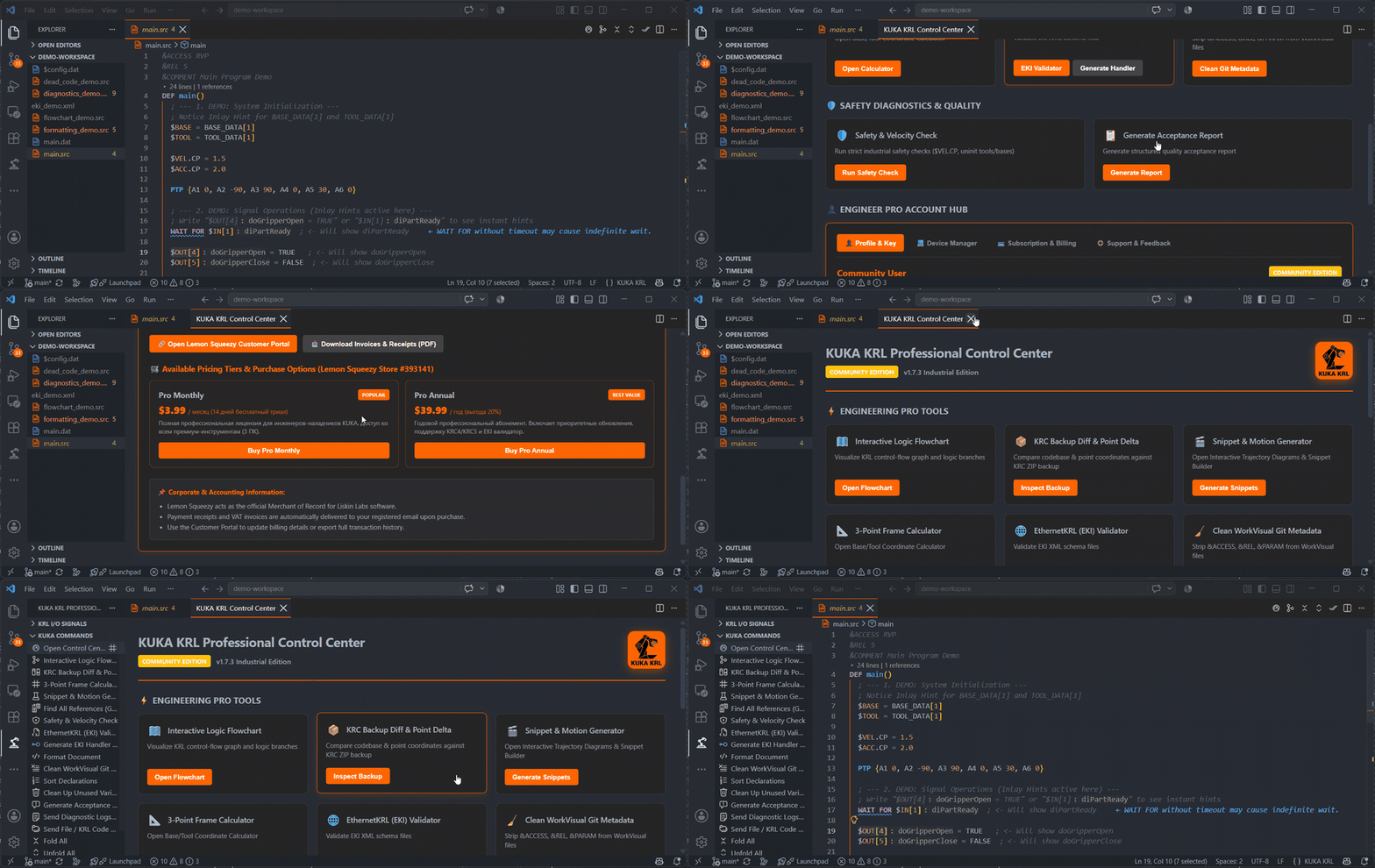
KUKA KRL Control Center running inside Visual Studio Code

KUKA KRL Control Center and workspace diagnostics inside Visual Studio Code

Key Workflows

Three daily workflows that save commissioning hours

Built around real shop-floor bottlenecks: tracking touched-up points across shifts, auditing KRL logic before deployment, and inspecting WorkVisual projects without booting heavy suites.

Workflow 01 · SmartPAD Backups

Compare .zip / KRCDiag backups and E6POS point deltas without unpacking

Mount controller archives (.zip, .ibz, KRCDiag) directly inside VS Code or diff two cell revisions side by side. When operators touch up points on the SmartPAD during a shift, the tool calculates coordinate deltas (ΔX, ΔY, ΔZ, ΔA, ΔB, ΔC) in standard Diff.

  • Runs purely in memory — no leftover temporary folders cluttering your engineering laptop.
  • Highlights E6POS shifts inside .dat files and separates trajectory edits from generated headers.
  • Includes an offline binary .evt (EVTX) event log decoder with KSS fault translation.
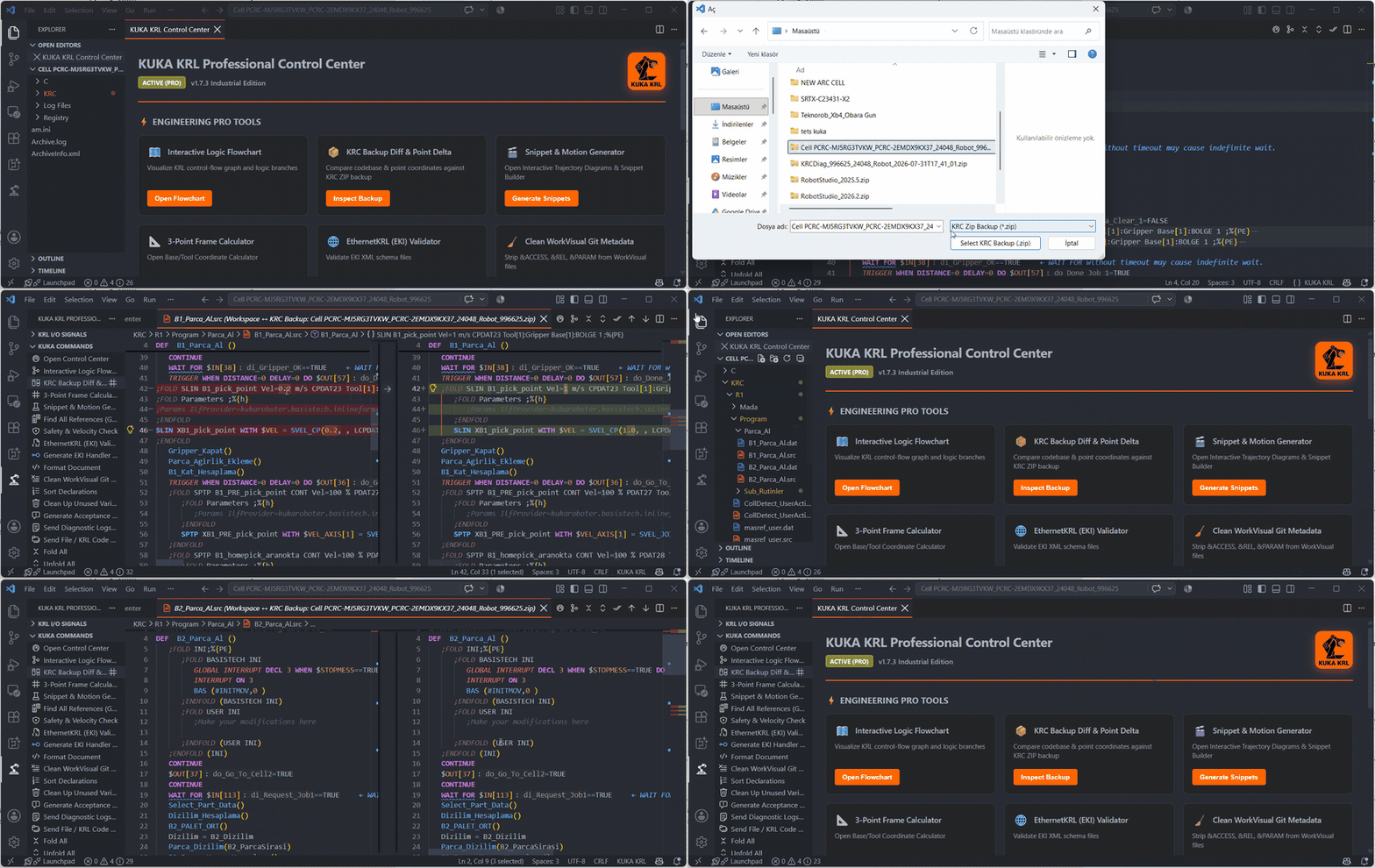
Comparing SmartPAD backup archives and point deltas in VS Code
Recorded in VS Code: KRC backup diff and point delta view
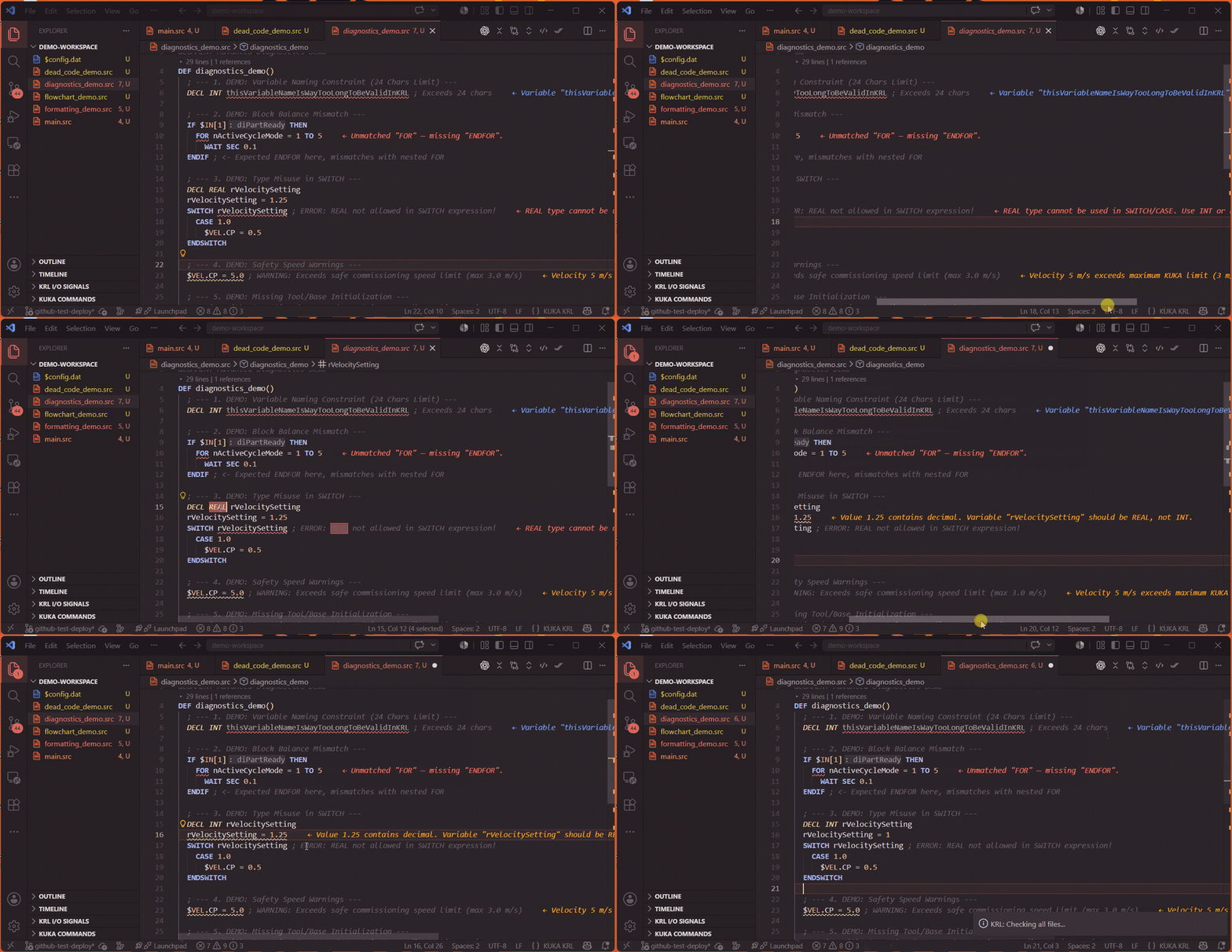
Static KRL diagnostics and type checking in VS Code
Recorded in VS Code: KRL static diagnostics and quick fixes
Workflow 02 · Static Audit & Safe Diff Fix

Static KRL analysis and diff-reviewed repairs

Detects common controller traps before code hits the pendant: unsynchronized $OUT calls breaking Advance Run, missing BRAKE before RESUME, motion inside DRYRUN ... ENDDRYRUN, unassigned $TOOL/$BASE frames, UTF-8 BOM (rejected by iiQKA.OS2), and KSS 5.4–9.3 / iiQKA.OS2 migration issues (PDAT/LDAT without VEL, SVEL_CP2, MotionParamSets.dat). Every repair opens in VS Code Diff while preserving ;%{PE} metadata.

  • Preserves Inline-Form checksums (;FOLD ... ;%{PE}) and UTF-8 without BOM (iiQKA.OS2), CP1251, and Windows-1252.
  • Checks DRYRUN ... ENDDRYRUN blocks, block balance, $IN/$OUT/$FLAG/$TIMER bounds, SPS.SUB, VASS 26 / VKRC, and PDAT/LDAT migration.
  • Explains the exact controller behavior behind each diagnostic warning.
Before / After examples with technical impact
Implicit Advance Run stop during blended motion

Setting $OUT[12] directly inside C_DIS motion triggers an implicit Vorlaufstopp. The robot decelerates to a brief stop at the approximation point instead of blending smoothly through the path.

Before: implicit Advance Run halt
LIN XPICK_APPROACH C_DIS
$OUT[12] = TRUE ; Breaks Advance Run: robot stops before next segment
LIN XPICK_PART
After: motion-synchronized TRIGGER
LIN XPICK_APPROACH C_DIS
TRIGGER WHEN DISTANCE=0 DELAY=0 DO $OUT[12] = TRUE
LIN XPICK_PART ; Continuous C_DIS blending preserved
Workflow 03 · .wvs, .vcmx & Live Bridge

WorkVisual (.wvs), KUKA.Sim (.vcmx), iiQKA EKI/RSI 6.x & Live Monitor

Open WorkVisual (.wvs) archives to inspect EtherCAT/PROFINET topology, export I/O tables to TIA Portal, TwinCAT 3, or EPLAN, and validate/generate iiQKA.EthernetKRL 6.x & iiQKA.RSI 6.x modules. On controller networks, connect via WCF (49002), iiQKA gRPC (443), OPC UA probe (4840), or KUKAVARPROXY (7000).

  • Inspect .wvs fieldbus mappings, KOP packages, and iiQKA.EthernetKRL 6.x / iiQKA.RSI 6.x contexts on macOS, Linux, or Windows without WorkVisual.
  • Stream up to 4,096 I/O signals with the CFG filter (KrcIoSignals.xml) and SmartPAD UserTexts.kxr / $config.dat labels.
  • Controller credentials are stored per-host in VS Code SecretStorage with zero hardcoded passwords.
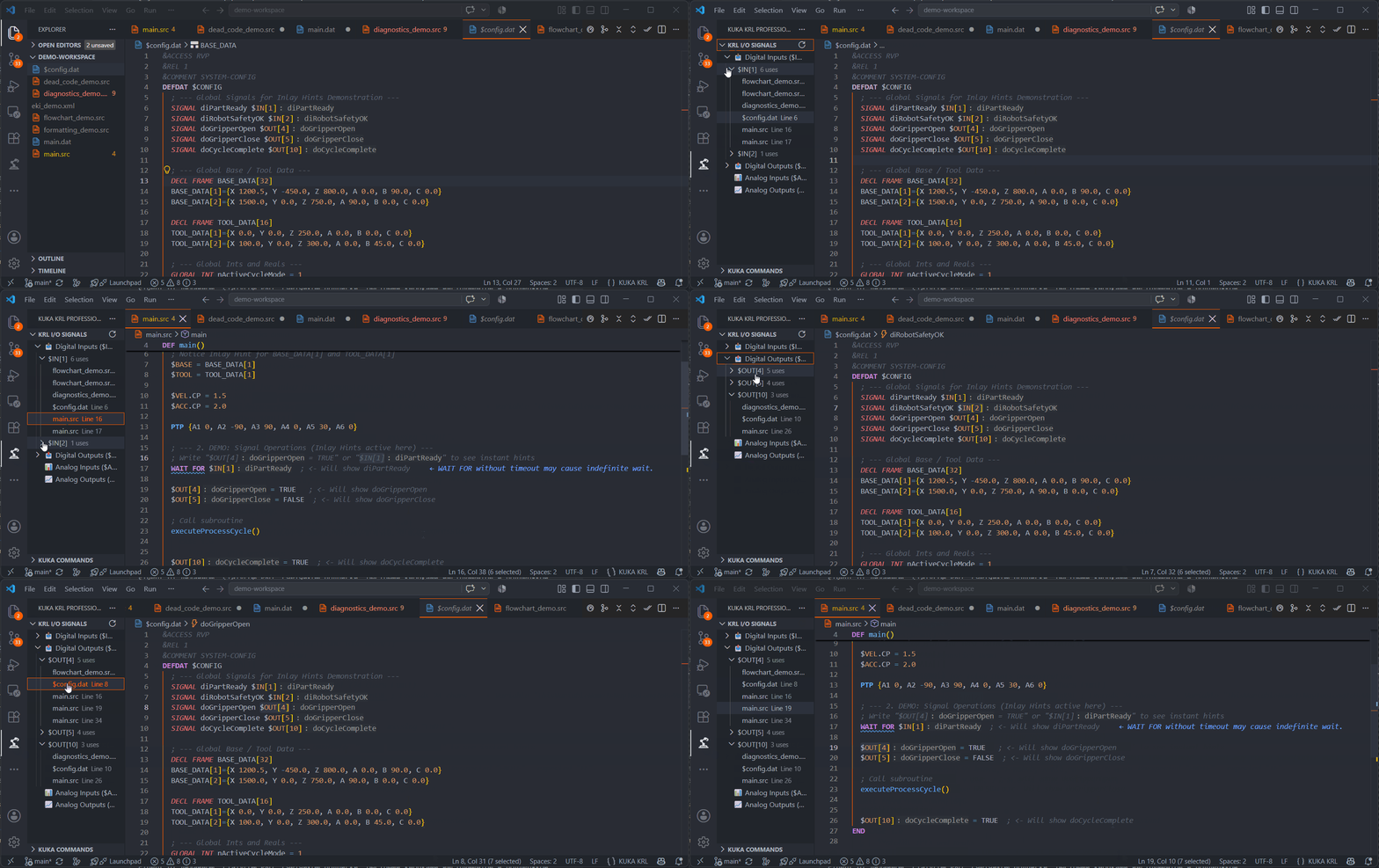
Inspecting I/O signals and project bindings in VS Code
Recorded in VS Code: I/O signal table and inlay hints

Honest Comparison

How this compares to plain syntax highlighters and WorkVisual

Each tool has a clear job. Here is where KUKA KRL Toolkit fits alongside standard KUKA engineering software.

Comparison between plain KRL highlighters, KUKA WorkVisual, and KUKA KRL Toolkit
Engineering taskPlain KRL Syntax (TextMate)KUKA WorkVisual / iiQWorks.SimKUKA KRL Toolkit (Community / Pro)
Supported operating systemsWindows / macOS / LinuxWindows onlyWindows / macOS / Linux (VS Code, Cursor)
Cross-file F12 navigation (.src ↔ .dat) & renameNo (keyword highlighting only)Basic navigationFull LSP, Find References, Call Hierarchy (Community)
Advance Run, BRAKE, ;FOLD & VASS 26 diagnosticsNoPartial during project buildReal-time static analysis & Diff fixes (Pro)
Zero-unpack .zip backup diff & E6POS deltasNoRequires project importIn-memory .zip mount & 6D deltas < 80 ms (Pro)
WorkVisual (.wvs) topology & I/O exportNoNative authoring environmentRead topology & export to TIA / TwinCAT / EPLAN (Pro)
Fieldbus hardware setup & controller deployNoPrimary purposeNot supported — use WorkVisual
Safety certification (SIL / PL)NoSafeOperation configurationNot safety-certified software (Non-SIL / Non-PL)
Clear boundary

KUKA KRL Toolkit does not replace WorkVisual for hardware bus configuration, SafeOperation, or controller deployment, and it is not safety-certified software (Non-SIL). It is built to speed up daily code review, backup diffing, and pre-commissioning checks.

Capabilities

Core engineering modules in one extension

Start with the 8 primary modules below, or expand the full VS Code command and settings registry on demand.

Backups & ArchivesPro

KRC Backup Diff (.zip / KRCDiag)

Mount .zip and .ibz backups in memory without extracting to disk, compare two revisions, and inspect 6D E6POS point deltas.

krl.compareKrcBackup
DiagnosticsPro

Static KRL Audit & Diff Auto-Repair

Detect Advance Run stops, missing BRAKE before RESUME, UTF-8 BOMs, and VASS 26 / VKRC issues with Diff review.

krl.fixAllSafeIssuesInFile
Fieldbus & IntegrationPro

WorkVisual (.wvs) & I/O Signal Export

Inspect EtherCAT/PROFINET topology, installed KOP packages, and export signal tables to TIA Portal, TwinCAT, and EPLAN.

krl.inspectFieldbusTopology
Controller BridgePro

Live Controller Monitor (WCF / KVP / iiQKA)

Read live $TOOL/$BASE frames, axis torques, and 4,096 I/O pins over WCF (49002), KUKAVARPROXY (7000), or iiQKA gRPC (443).

krl.live.openDashboard
Logic AnalysisPro

Interactive Program Flowchart

Generate interactive IF, SWITCH, LOOP, and subroutine graphs with click-to-source navigation and SVG export.

krl.showFlowchart
Backups & ArchivesPro

Binary Event Log Decoder (.evt / EVTX)

Decode controller binary .evt crash logs offline across 6 languages without external tools.

krl.openEventLog
Core EditorCommunity

KRL Language Server & F12 Navigation

Free autocomplete for 957 system variables and 116 functions, cross-file F12 navigation (.src/.dat), formatter, and 6 themes.

krl.sortDeclarations
DiagnosticsPro

Dead-Code & Unused Point Cleanup

Identify unreachable branches and unused declarations in .src and .dat files before commissioning sign-off.

krl.cleanupUnusedVariables

Pricing

Straightforward licensing for individuals and teams

Core editor features are free for learning and non-commercial work. Commercial engineering and Pro tools require an active license.

Community

Free forever
Free

Core KRL editor for learning, academic labs, and 30-day internal evaluation.

  • KRL syntax highlighting & 6 shop-floor themes
  • LSP autocomplete (957 vars, 116 functions)
  • Cross-file F12 navigation & FOLD/UNFOLD
  • Unlimited file length & basic syntax checks

Engineer Pro

1 workstation
$149/ year

Full Pro commissioning and diagnostics suite. Includes a 14-day free trial without a card.

  • Advance Run, BRAKE, VASS 26 & Diff auto-repair
  • Zero-unpack .zip backup diff & 6D E6POS deltas
  • .wvs, .vcmx, .evt log decoder & flowcharts
  • Live controller bridge & 30-day offline cache

Team

Up to 5 seats
$499/ year

For commissioning squads and automation groups under a single corporate invoice.

  • Up to 5 engineering workstations
  • All Engineer Pro modules for every seat
  • Single corporate invoice & seat management
  • Offline Air-Gap (.lic) activation support

Integrator / Enterprise

20–100 seats
$1,499/ year

For system integrators and plants running segmented or air-gapped factory networks.

  • 20 seats (or 100-seat Enterprise Plant option)
  • Ed25519 signed .lic files for air-gapped cells
  • Corporate Invoice / SEPA / PO & 0% EU VAT
  • Priority engineering support on edge cases

Need a one-time license for 1 PC? Pro Lifetime ($699) is available with no recurring renewal.

Plant-wide deployments up to 100 seats are covered by Enterprise Plant ($4,999 / year via invoice).

Billing & invoices by Dodo Payments

Cards, wire transfer, instant PDF tax receipts, and 0% EU VIES Reverse Charge with a valid VAT ID.

1-click cancellation

Cancel anytime directly inside VS Code (krl.manageSubscription) or in the Customer Portal.

14-day refund guarantee

If it does not fit your KUKA workflow, request a refund via the built-in VS Code support chat within 14 days.

Launch code LAUNCH30 (−30%) is applied automatically at checkout. Local EUR/RUB/TRY prices are indicative; checkout settles in USD.

B2B & Procurement

Purchasing for a team or legal entity

Order via Dodo Payments with automated VAT invoicing, or request a formal Purchase Order / SEPA invoice and offline Air-Gap keys for restricted plant networks.

  • Tax PDF receipts, corporate billing details, and EU VIES 0% VAT Reverse Charge.
  • Signed Ed25519 .lic license files for air-gapped commissioning laptops.
  • Request a company invoice directly from VS Code via krl.requestCorporateInvoice.

Security & Air-Gap

Built for isolated shop-floor networks

Your robot programs and cell backups stay on your engineering machine at every step.

1. 100% local processing

KRL parsing, AST diagnostics, coordinate delta math, and .zip/.wvs inspection execute locally on your workstation CPU/RAM. No robot source code leaves your computer.

2. Air-Gap offline licensing

For defense and automotive cells without outbound internet, activate seats with signed Ed25519 .lic files. Online commercial keys also include a 30-day offline grace cache.

3. Supply-chain verification

Every release binary is scanned by ReversingLabs Spectra Assure (0 CVE). Documentation, issue tracker, and EULA are publicly available on GitHub.

About & Direct Contact

Who builds this tool

SL
Silvestr Liskin (LiskinLabs)
Robotics Commissioning Engineer & Author of KUKA KRL Engineering Toolkit

I work on industrial KUKA robotics commissioning and cell software. I built this extension out of day-to-day needs on the shop floor: catching Advance Run stops before loading a pendant, diffing SmartPAD backups cleanly, and inspecting .wvs I/O mappings without waiting for heavy desktop suites.

Need a company invoice, help with an unusual KRC archive, or an Air-Gap evaluation for your plant? Reach out via the built-in VS Code support chat or GitHub Issues — I answer personally.

LiskinLabsLiskinLabs

Independent engineering tools for KUKA KRL development and static analysis in Visual Studio Code.

Legal

Independent software by LiskinLabs (Silvestr Liskin), not affiliated with KUKA AG or Microsoft Corporation. KUKA, KRL, KRC, KSS, WorkVisual, KUKA.Sim, and SmartPAD are trademarks of KUKA Roboter GmbH. This tool is not safety-certified (Non-SIL / Non-PL) and does not replace physical T1 controller verification.

© 2024–2026 LiskinLabs (Silvestr Liskin)

14-day free Pro trial

Evaluate all Pro modules for 14 days with no credit card required.

  1. 1. Install the extension
    Install KRL Engineering Toolkit from the VS Code Marketplace.
  2. 2. Open Command Palette
    Press Ctrl+Shift+P (or Cmd+Shift+P on macOS).
  3. 3. Start the trial
    Run the command krl.startTrial.